


How to Reduce Screen Blockage When Using Sodium Sulfate Filler Masterbatch
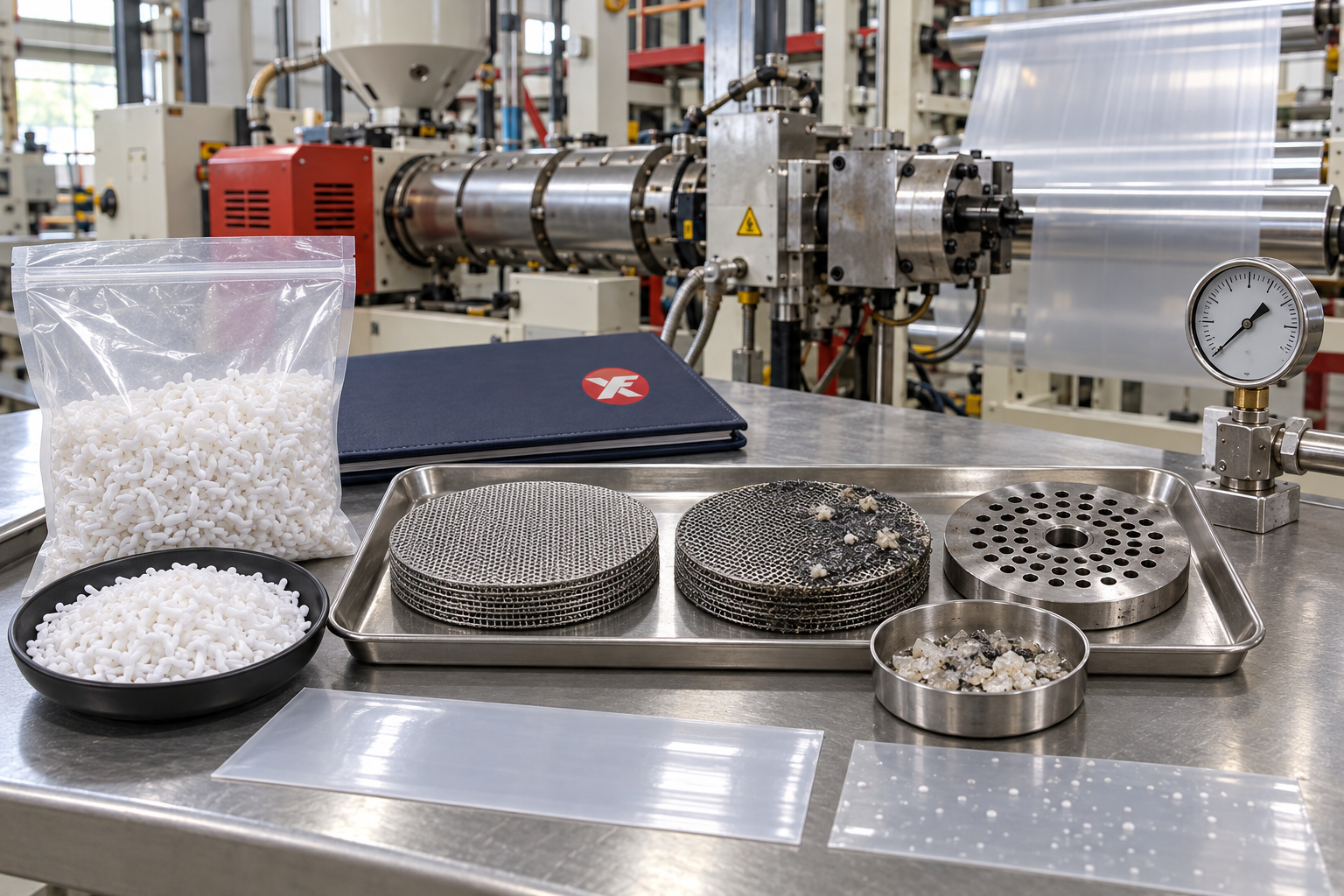
Screen blockage and die buildup can reduce output, increase production interruptions and create defects in PE blown film.
When these problems appear after adding sodium sulfate filler masterbatch, the masterbatch is often blamed immediately. However, the actual cause may involve filler dispersion, moisture, recycled resin, processing temperature, screen selection or excessive dosage.
A controlled troubleshooting process helps manufacturers identify the cause without making unnecessary formulation changes.
What Does the Screen Pack Do?
The screen pack is installed between the extrusion screw and die. It filters contamination and helps create stable pressure before the melt enters the die.
During normal production, the screen may collect:
– Contaminants from recycled resin
– Undispersed filler particles
– Degraded polymer
– Burnt material
– Dust and foreign matter
– Colour-masterbatch agglomerates
– Residue from previous production
Some pressure increase is normal over time. Rapid blockage or frequent screen replacement indicates that the raw materials or processing conditions should be investigated.
Common Signs of Screen Blockage
Operators may observe:
– Increasing extrusion pressure
– Reduced production output
– Unstable film bubbles
– Thickness fluctuations
– Melt-temperature changes
– Motor-load increases
– White spots or gels
– Irregular material flow
– Frequent screen changes
The production records should be reviewed to determine when the pressure started to rise and which materials were used at that time.
Check the Masterbatch Dispersion
Good dispersion is essential when using filler masterbatch.
Large agglomerates may be trapped by the screen pack or pass through the system and appear as film defects.
Before production, inspect the masterbatch for:
– Excessive powder
– Large or irregular agglomerates
– Clumped pellets
– Inconsistent pellet size
– Surface contamination
– Damaged packaging
During the film trial, inspect the finished product under backlighting. White spots, rough areas and weak points may indicate that the filler is not dispersing evenly.
Examine the Entire Formulation
Screen blockage is not always caused by the filler masterbatch.
Every component should be checked, including:
– Virgin PE resin
– Recycled PE resin
– Colour masterbatch
– Desiccant masterbatch
– Anti-block additives
– Reprocessed edge material
– Other functional additives
Recycled materials may contain paper, metal, sand, degraded plastic or incompatible polymers. These contaminants can rapidly block the screen, particularly when their quality changes between batches.
Run controlled tests with individual materials to identify the source.
Avoid Excessive Addition
A dosage that performs well in a thick garbage bag may not be suitable for thin transparent film.
Excessive filler addition can increase the amount of solid material passing through the extrusion system and may make dispersion problems more visible.
Begin with a conservative addition level and increase it gradually. At every stage, record:
– Extrusion pressure
– Motor load
– Output rate
– Film-bubble stability
– Screen-changing interval
– Film appearance
– Rejection rate
If pressure rises rapidly after a dosage increase, return to the previous stable formulation and investigate before continuing.
Maintain Uniform Premixing
Uneven mixing can create sections of the production batch with an excessively high filler concentration.
For reliable results:
1. Weigh all materials accurately.
2. Mix the resin and masterbatch thoroughly.
3. Avoid pouring concentrated masterbatch directly into a partially filled hopper.
4. Calibrate automatic dosing systems.
5. Prevent material separation during conveying.
6. Keep trial batches clearly identified.
Consistent feeding helps maintain stable extrusion pressure and product quality.
Review Processing Temperature
If the processing temperature is too low, the carrier resin may not melt and disperse effectively. If it is too high, the polymer or additives may degrade and form burnt residue.
The appropriate temperature depends on:
– PE resin grade
– Carrier resin
– Filler dosage
– Extruder design
– Screw condition
– Production speed
– Film thickness
Temperature changes should be made gradually. Monitor melt quality, pressure and film appearance after every adjustment.
Use the supplier’s processing guidance as a starting point, then optimise it for the actual production line.
Check Moisture Before Production
Moisture can affect melt stability and contribute to deposits or film defects.
Possible moisture sources include:
– Open masterbatch bags
– Wet recycled material
– Damaged packaging
– Humid warehouse conditions
– Condensation
– Wet mixing equipment
– Moisture inside conveying pipes
Keep materials sealed and stored on raised pallets in a dry warehouse. If drying is necessary, confirm the appropriate conditions with the supplier.
Excessive drying temperature may soften the pellets or affect feeding.
Select an Appropriate Screen Pack
A screen that is too coarse may allow contamination to reach the film. A screen that is too fine may increase pressure rapidly, particularly in formulations containing recycled material or filler.
Screen selection should consider:
– Film thickness
– Product-quality requirements
– Recycled-material content
– Filler dosage
– Extruder capacity
– Normal operating pressure
– Required filtration level
The objective is to achieve sufficient filtration without creating unnecessary pressure or reducing output excessively.
Changes to the screen configuration should be recorded and evaluated under stable production conditions.
Inspect the Screw and Barrel
Worn screws and barrels may reduce mixing and plasticisation quality.
Possible signs include:
– Unstable output
– Poor dispersion
– Long plasticisation time
– Pressure fluctuations
– Increased temperature requirements
– Material remaining in the barrel
Dead zones may also trap material, which can degrade and later appear as black spots or gels.
Regular equipment inspection can prevent raw-material problems from being confused with mechanical wear.
Clean the Die Correctly
Die buildup may appear as deposits around the die lip, resulting in lines, rough film or interrupted production.
Possible causes include:
– Degraded resin
– Additive migration
– Excessive temperature
– Poor dispersion
– Contaminated recycled material
– Long production runs
– Dead material inside the die
Follow the equipment manufacturer’s cleaning procedure. Avoid using tools that may damage polished die surfaces.
After cleaning, record how long the machine operates before deposits return. This information can help identify whether the cause is related to the formulation or equipment.
Monitor Extrusion Pressure
Pressure data is useful for detecting problems before the screen becomes completely blocked.
Record:
– Starting pressure
– Pressure after production stabilises
– Rate of pressure increase
– Masterbatch dosage
– Recycled-material batch
– Production speed
– Screen configuration
– Time between screen changes
A gradual pressure increase may be normal. A sudden change usually indicates contamination, material inconsistency or feeding problems.
Compare Cost per Finished Product
Frequent screen changes create additional costs through:
– Machine downtime
– Lost production
– Material waste
– Labour
– Cleaning
– Restart defects
– Reduced daily output
Therefore, a low-priced masterbatch is not economical if it significantly increases downtime or rejection rates.
Calculate the real cost using stable, acceptable finished production rather than raw-material price alone.
A Practical Troubleshooting Sequence
When screen blockage increases, use a controlled sequence:
1. Record the current formulation and machine settings.
2. Inspect all materials and packaging.
3. Test a newly opened masterbatch bag.
4. Check recycled resin separately.
5. Return to the last stable dosage.
6. Clean the hopper, screw, screen and die as required.
7. Confirm processing temperatures.
8. Check the dosing and mixing system.
9. Run a small controlled batch.
10. Change only one major variable at a time.
This method is more reliable than adjusting temperature, dosage and screen configuration simultaneously.
Information to Send the Supplier
For technical support, provide:
– Masterbatch batch number
– PE resin formulation
– Recycled-material percentage
– Addition ratio
– Extrusion temperatures
– Screen configuration
– Starting and final pressure
– Production duration
– Photos of screen residue
– Images of film defects
– Production videos when available
These details help the supplier distinguish between dispersion, contamination, moisture and equipment-related problems.
Conclusion
Screen blockage and die buildup can result from several interacting factors. The filler masterbatch, recycled resin, moisture, mixing, temperature, screen pack and equipment condition should all be evaluated.
Use a conservative dosage, maintain uniform premixing and record extrusion-pressure changes during each trial. A stable formulation with longer production runs may provide better overall savings than a formulation focused only on maximum filler addition.
Xinfeng manufactures sodium sulfate filler masterbatch for selected PE blown-film and plastic-processing applications.
To discuss extrusion stability or request a sample, visit Xinfeng Masterbatch.
Send us a message now for quotation.
WhatsApp: https://wa.memessage/IRZROGA5F2RQO1
WhatsApp:+86 17835035161