


Why Does Sodium Sulfate Filler Masterbatch Cause White Spots?
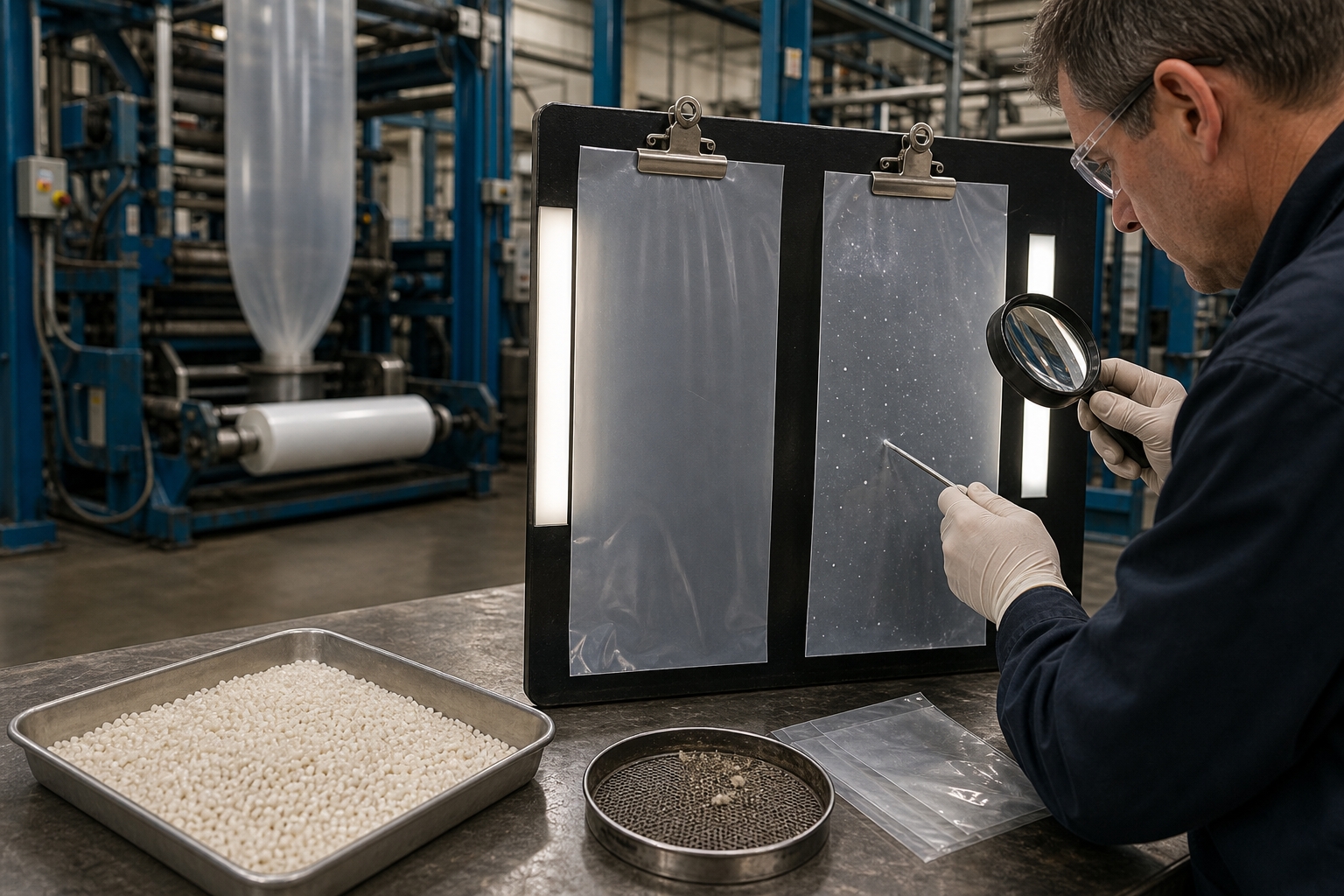
White spots, visible particles and rough surfaces are common concerns when a new filler masterbatch is introduced into plastic production.
These defects may appear in PE blown film, plastic bags or PP injection-molded products. Although the filler masterbatch is often suspected first, the actual cause may also involve resin compatibility, processing temperature, moisture, contamination or machine condition.
Sodium sulfate filler masterbatch can provide stable dispersion in a suitable formulation, but it must be correctly selected, stored, mixed and processed.
This guide explains the main causes of white spots and how manufacturers can troubleshoot them systematically.
What Is Sodium Sulfate Filler Masterbatch?
Sodium sulfate filler masterbatch is a granular functional additive made from finely processed sodium sulfate, a compatible carrier resin and selected processing additives.
It may also be called:
Na2SO4 filler masterbatch
Sodium sulfate filling masterbatch
Sodium sulfate transparent filler masterbatch
Transparent filling masterbatch
Plastic cost-reduction masterbatch
In suitable PE or PP formulations, it can replace a controlled portion of plastic resin to help reduce material costs.
The final result depends on the masterbatch grade, carrier compatibility, dosage, processing equipment and finished-product requirements.
What Do “White Spots” Look Like?
The term “white spots” may describe several different defects:
Small unmelted particles
Irregular opaque areas
Clusters of filler
Contaminated granules
Rough raised points
Streaks in the machine direction
Localized haze
Tiny holes surrounded by white material
These defects do not always have the same cause.
Before adjusting the formula, examine:
Size of the defect
Shape
Distribution
Whether it can be rubbed or scraped away
Whether it appears continuously or occasionally
Whether it follows the film extrusion direction
Whether it appears in every production batch
Clear photographs and retained samples make troubleshooting easier.
Cause 1: Poor Filler Dispersion
Poor dispersion means that the filler is not distributed uniformly throughout the polymer.
Instead of remaining as fine, well-distributed material, it may form larger clusters that become visible in thin film or on molded surfaces.
Possible causes include:
Inconsistent masterbatch production
Unsuitable filler processing
Poor surface treatment
Inadequate carrier resin
Excessive filler concentration
Insufficient extrusion mixing
Incorrect processing conditions
If white spots appear even at a conservative dosage under stable conditions, the masterbatch grade may need to be reviewed.
Cause 2: Incompatible Carrier Resin
The masterbatch carrier must be compatible with the customer’s base polymer.
Common applications may use:
LDPE
LLDPE
HDPE
PP
Mixed PE
Virgin and recycled resin blends
An incompatible carrier may not melt or mix uniformly with the base resin. This can create visible particles, weak interfaces and uneven surfaces.
Before requesting a sample, provide the supplier with:
Exact polymer type
Resin grade, if available
Processing method
Processing temperature
Finished-product application
Do not assume that every sodium sulfate filler masterbatch grade is equally suitable for PE film and PP injection molding.
Cause 3: Processing Temperature Is Too Low
If the processing temperature is insufficient, the carrier resin or other formulation components may not plasticize completely.
Possible symptoms include:
Unmelted granules
White particles
Rough film surfaces
High or unstable pressure
Poor film-bubble stability
Uneven molded parts
Check the complete temperature profile rather than only the final machine zone.
Temperature requirements depend on:
Base resin
Masterbatch carrier
Screw design
Production speed
Residence time
Equipment condition
Increase temperature gradually if required. Excessive heat can cause a different set of problems, including degradation, odor and discoloration.
Cause 4: Poor Mixing Before Processing
Even a well-formulated masterbatch can produce inconsistent results if it is not mixed evenly with the resin.
Uneven blending may cause some sections of the production run to contain too much masterbatch and others too little.
Check:
Mixing time
Mixer capacity
Order of material addition
Granule-size differences
Material separation during transport
Hopper feeding
Dosing accuracy
For continuous production, gravimetric or controlled volumetric dosing may provide greater consistency than manual estimation.
Do not measure the dosage by eye.
Cause 5: Excessive Addition Ratio
As the masterbatch dosage increases, the extrusion and mixing system must distribute more filler throughout the polymer.
If the equipment or formulation cannot support the selected ratio, visible defects may appear.
Other possible symptoms include:
Increased haze
Rough surfaces
Reduced film strength
Weak heat seals
Brittle molded parts
More die deposits
Increased rejection rates
Reduce the dosage and compare the result under otherwise stable conditions.
If the defects decrease significantly, the previous ratio may have exceeded the practical limit of that formulation or equipment.
Cause 6: Moisture Exposure
Moisture can contribute to surface defects and unstable processing.
Possible sources include:
Damaged masterbatch packaging
Open bags
Humid warehouse conditions
Wet recycled resin
Condensation after transportation
Wet mixing equipment
Material stored directly on the floor
Possible symptoms include:
Bubbles
Small holes
Surface marks
Extrusion noise
Unstable film bubbles
Irregular particles
Inspect the complete raw-material system. Do not automatically assume that the sodium sulfate masterbatch is the only possible moisture source.
If drying is considered, request grade-specific instructions from the supplier. Incorrect temperature or drying time may damage the carrier or cause granules to stick together.
Cause 7: Contaminated Recycled Plastic
Recycled PE or PP may contain:
Paper
Sand
Metal
Pigment clusters
Incompatible polymers
Degraded plastic
Residual adhesive
Filtered but visible particles
These contaminants can resemble poorly dispersed filler.
To distinguish the source:
Run a controlled test using a clean virgin resin batch.
Keep the masterbatch dosage unchanged.
Compare the defects with the recycled formulation.
Inspect the recycled granules and screen residue.
If the spots disappear with virgin resin, the recycled material or interaction with that material requires further investigation.
Cause 8: Machine Contamination
Residue from previous production may remain in:
Hopper
Mixer
Screw
Barrel
Screen pack
Die
Adapter
Injection unit
Old material may degrade and detach during the next run, appearing as black, yellow, brown or white particles.
Before evaluating a new masterbatch sample:
Clean the mixing system
Remove unrelated materials
Inspect the screen
Check the die
Purge the machine where appropriate
Record the previous production formula
A clean trial reduces false conclusions about the sample.
Cause 9: Damaged or Blocked Screen Pack
The screen pack helps filter contaminants and influences melt pressure.
Possible screen-related symptoms include:
Changing pressure
More visible particles
Reduced output
Streaks
Material deposits
Uneven flow
Inspect and replace the screen according to normal production procedures.
Compare screen-changing frequency between the original and trial formulas. A significant increase may indicate contamination, poor dispersion or incompatibility.
Cause 10: Worn Screw or Insufficient Mixing
A worn screw may have reduced plasticizing and mixing performance.
The same formulation may perform differently on:
A new extrusion line
An older machine
A high-mixing screw
A basic general-purpose screw
Machines with different outputs
Check:
Screw and barrel wear
Screw speed
Motor load
Melt pressure
Production rate
Residence time
Mixing-section design
If reducing the output improves dispersion, the original production speed may exceed the mixing capability of the equipment for that formulation.
Cause 11: Material Degradation
Overheated or excessively retained plastic may degrade inside the machine.
Degraded material can create:
Dark spots
Yellow particles
Streaks
Gels
Rough surfaces
Odor
Review:
Temperature settings
Machine stoppages
Residence time
Dead zones
Previous material
Cleaning procedures
White or translucent gels may be mistaken for masterbatch particles, so inspect defect samples carefully.
Cause 12: Other Additive Interactions
The complete formulation may contain:
Color masterbatch
Antiblock masterbatch
Desiccant masterbatch
Toughening additive
Slip additive
Processing aid
One of these materials—or an interaction between them—may contribute to the visible defect.
Introduce major formulation changes in separate controlled stages.
If several new additives are tested simultaneously, it becomes difficult to identify which one caused the problem.
Troubleshooting White Spots in PE Blown Film
For PE film, record:
Base resin and grade
Recycled-material percentage
Sodium sulfate masterbatch dosage
Other additives
Temperature profile
Screw speed
Extrusion pressure
Film thickness
Production output
Screen condition
Then check:
Are the Spots Uniformly Distributed?
Uniform defects may indicate dosage, dispersion or resin compatibility.
Do They Appear in Streaks?
Machine-direction streaks may indicate die contamination, flow problems or localized material buildup.
Do They Appear Intermittently?
Occasional defects may come from contaminated raw materials, machine residue or inconsistent feeding.
Do They Increase over Time?
Gradual increases may indicate screen blockage, die deposits or material degradation.
Troubleshooting White Spots in PP Injection Molding
For PP injection molding, inspect:
Surface particles
Flow marks
Uneven gloss
Defects around gates
Weak points
Color variation
Unmelted granules
Review:
PP grade and melt flow
Masterbatch carrier
Back pressure
Screw speed
Barrel temperatures
Plasticizing time
Injection speed
Machine cleanliness
Defects near the gate may have different causes from particles spread uniformly across the molded part.
A Controlled Troubleshooting Procedure
Step 1: Retain Defective Samples
Keep the film, bag or molded part and mark its production date and batch.
Step 2: Record the Complete Formula
Include every resin, recycled material and additive.
Step 3: Check Material Packaging and Batches
Inspect masterbatch and resin for moisture, contamination, clumping and incorrect labels.
Step 4: Clean and Inspect the Machine
Check the hopper, mixer, screw, screen and die or mold.
Step 5: Reduce the Masterbatch Dosage
Run a controlled comparison without changing several other variables.
Step 6: Test with Clean Virgin Resin
This helps identify whether recycled material contributes to the problem.
Step 7: Adjust Processing Conditions Gradually
Change temperature, output or screw speed one factor at a time.
Step 8: Compare a Different Masterbatch Batch or Grade
If defects persist under controlled conditions, evaluate batch consistency and carrier compatibility with the supplier.
How to Evaluate Dispersion
Possible evaluation methods include:
Visual inspection under consistent lighting
Thin-film comparison
Surface microscopy
Filter-residue examination
Mechanical testing
Long-term machine trial
Comparison of screen-changing frequency
The method should match the application and quality requirement.
For transparent or translucent film, small particles may be more visible than in thick or black products.
Why White Spots Increase Production Costs
Visible defects affect more than appearance.
They may cause:
Film breakage
Weak seals
Printing defects
Customer rejection
More scrap
Slower production
Frequent screen changes
Additional machine cleaning
A low-priced masterbatch may not create real savings if it produces unstable dispersion.
Calculate the cost per qualified finished product, including scrap and downtime.
Information to Send the Supplier
For efficient technical support, provide:
Product name and batch
Base resin
Virgin/recycled ratio
Complete formulation
Masterbatch dosage
Processing method
Temperature profile
Film thickness or part dimensions
When the spots first appear
Photos under good lighting
Defective samples
Screen residue, if available
Detailed information helps distinguish a masterbatch problem from contamination, moisture, incompatibility or equipment conditions.
Sodium Sulfate Filler Masterbatch from Xinfeng
Xinfeng manufactures sodium sulfate filler masterbatch for suitable PE blown-film and PP injection-molding applications.
Our functional additive range also includes:
High-transparency toughening additives
Color masterbatch
Antiblock masterbatch
Desiccant masterbatch
Other plastic functional additives
We recommend selecting the masterbatch according to the customer’s resin system, equipment and finished-product requirements.
If you experience white spots, poor dispersion or surface defects, send us your production information and samples for application review.
Frequently Asked Questions
Do white spots always mean poor masterbatch quality?
No. They may also result from resin incompatibility, low processing temperature, moisture, recycled-material contamination or machine residue.
Can a high dosage cause visible particles?
It may increase the dispersion demand on the formulation and equipment. Reduce the dosage and conduct a controlled comparison.
Why do white spots appear only with recycled PE?
The recycled material may contain contamination, moisture, degraded resin or incompatible polymers.
Should the processing temperature be increased?
Only gradually and within suitable limits for the resin and masterbatch carrier. Excessive temperature can cause degradation.
Can moisture cause white spots?
Moisture may contribute to surface defects, bubbles and unstable processing. Inspect every raw material and storage condition.
How can I check whether the masterbatch is compatible?
Test the material with a known, clean resin under controlled conditions and compare dispersion, processing stability and finished-product quality.
What information should I provide for troubleshooting?
Provide the complete formula, material batches, dosage, temperatures, equipment information and clear photos or samples of the defects.
Request Dispersion Support
Send Xinfeng your:
Base resin
Current formulation
Masterbatch dosage
Processing equipment
Temperature settings
Photos of white spots
Finished-product requirements
We can help review the application and recommend a suitable sodium sulfate filler masterbatch trial.
Send us a message now for quotation.
WhatsApp: https://wa.memessage/IRZROGA5F2RQO1
WhatsApp:+86 17835035161